EarsDeep · dub stab instrument

Drag one puck.
Get a chord.

CHORD // STAB is a five-voice dub stab instrument. You do not pick notes — you drag a puck across an isometric pad and the chord morphs between four minor dub voicings while the same movement sweeps a 24 dB resonant filter. Underneath, a continuous-phase sub bass and a 16-step micro-sequencer keep it in time.

  • 5 voices per stab
  • 4 dub voicings
  • 16 steps
  • 3 formats
  • Universal macOS
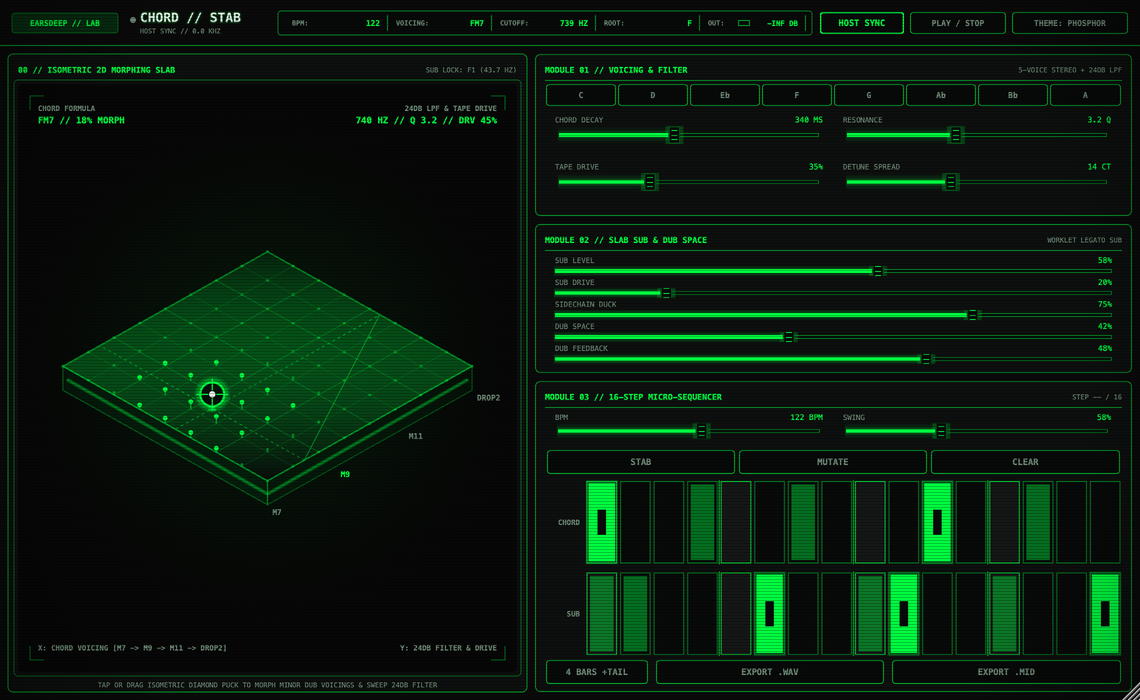
The CHORD // STAB interface: an isometric morph pad with four voicing nodes on the left, and on the right the voicing/filter module, the sub & dub module, and the 16-step micro-sequencer.
PHOSPHOR theme · the isometric pad is the whole chord engine
AU// VST3// STANDALONE// APPLE SILICON + INTEL// SIGNED & NOTARISED// NO ILOK

A stab is a decision, not a note

In dub techno and deep house the chord does not carry a melody — it carries the groove. It hits, it opens a filter, it falls back, and then the space takes over. Most synths give you an oscillator and ask you to build that decision yourself: pick the voicing, voice the fifth, decide which note drops an octave, remember the filter move. CHORD // STAB stores the decision in a shape instead.

X The voicing axis

The horizontal axis is the chord: M7 → M9 → M11 → DROP2. They are interpolated, not switched, so you can sit between two voicings and get a chord that exists nowhere else. The fifth voice in DROP2 drops a whole octave — that is what makes it sound like dub and not like jazz.

Y The filter axis

The vertical axis is a logarithmic sweep from 160 Hz to 4.8 kHz into a cascaded 24 dB/oct resonant low-pass with its own 12 ms attack envelope. The same movement also drives the tape saturation, so pulling the puck down darkens and softens the stab at once.

S Never a click

Three stabs ring at once. A fourth steals the oldest with a 12 ms fade, and a ringing stab moves to a new chord by slewing its oscillator increments and filter targets over 20 ms — the envelope keeps running. That is why moving the puck during a note sounds like a morph and not like a re-trigger.

What is inside

Six engines, one window, no menu diving.

01 Five-voice stab pool

Each stab is five detuned saw + triangle voices, constant-power panned across the stereo field. Three stabs can ring at once; accents raise the drive and push more into the delay.

02 Slab sub bass

A continuous-phase sub that never resets on trigger or pitch change, so legato steps glide instead of clicking. The gate is scheduled in absolute sample frames, and every stab ducks it for 12 ms.

03 Dub delay

Stereo cross-feedback with a dotted-1/8 tap left and a 1/4-note tap right, filtered at 160 Hz / 2.6 kHz inside the loop so feedback darkens instead of piling up.

04 16-step micro-sequencer

Two lanes — chord and sub — running host-synced or from the internal clock. Triggers are sample accurate: the engine splits the block at the exact frame of each step. Shuffle pushes odd sixteenths late.

05 Tape saturation

An asymmetrical tanh shaper with a deliberate bias, so the positive and negative halves of the waveform saturate differently. Warm, not aggressive — the drive control tops out at 3.4×.

06 Export and MIDI

Render 4 bars of WAV (with or without the delay tail) or a 3-track MIDI file at 480 PPQ straight into your DAW. Play it live from any MIDI keyboard; notes C1–B1 drive the sub directly.

Two faces, one instrument

The interface is a phosphor CRT. You can have it green or amber — the theme is a saved parameter, so it travels with the project and opens the way you left it.

CHORD // STAB in the PHOSPHOR theme: green on near-black.
PHOSPHOR — the default. Green on near-black, scanlines and a soft vignette, like the terminal the first detuned saw was written on.
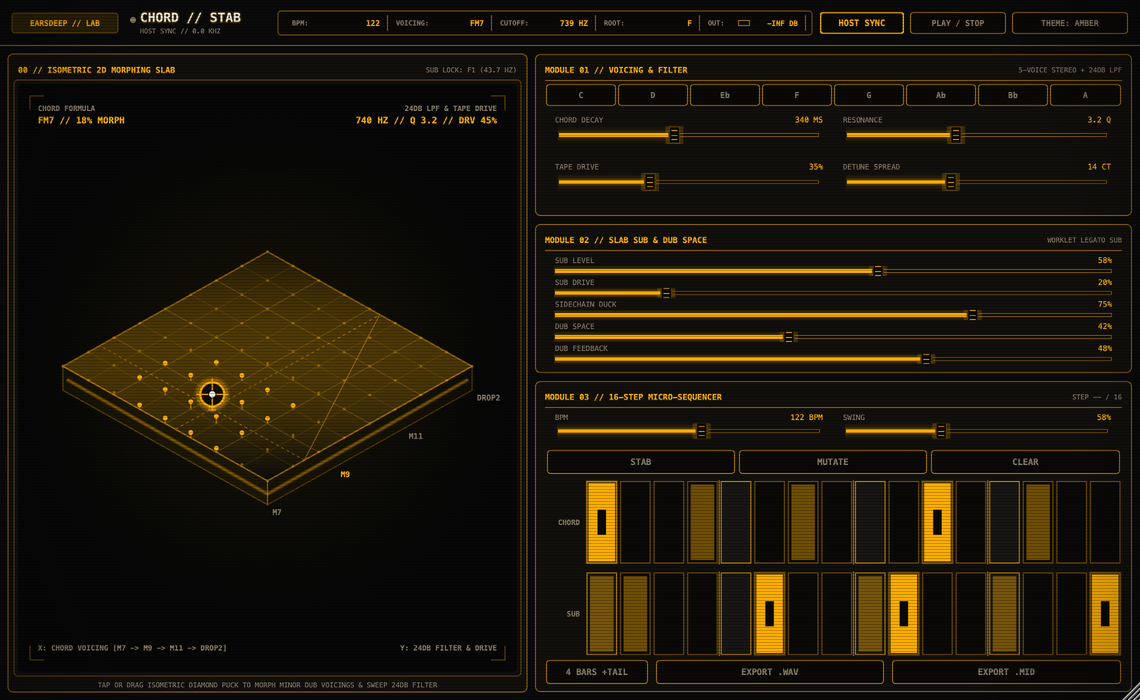
CHORD // STAB in the AMBER theme: amber on warm black.
AMBER — warmer, easier in a dark room next to a hardware desk. Same layout, same numbers, no relearning.

Switch with one button in the top bar, or with the theme parameter from your DAW.

Hear it

Short, unedited captures. Nothing is pre-rendered — the audio comes out of the plug-in in real time.

One puck, four voicings. Dragging the isometric pad while a stab rings — the morph between M7, M9, M11 and DROP2.
The sub and the duck. Why the sub is sidechained by every stab, and what happens when you turn the duck off.
Export a loop. Four bars of WAV with the tail, and the same pattern as a three-track MIDI file, dropped straight into a session.

Specs

Everything you need to know before you install it.

FormatsAU · VST3 · Standalone
PlatformmacOS 11 or newer · universal binary (x86_64 + arm64)
Instrument typeSynth (receives MIDI, emits MIDI thru)
Chord engine4 dub voicings, interpolated — M7, M9, M11, DROP2
Voices5 saw + triangle voices per stab, 3 simultaneous stabs
FilterCascaded 24 dB/oct resonant low-pass, 160 Hz – 4.8 kHz
Sub bassContinuous-phase sine + 2nd harmonic, sidechain ducked
DelayStereo cross-feedback, dotted-1/8 + 1/4 taps, filtered loop
Sequencer2 × 16 steps, host-synced or internal, sample accurate
Master chain28 Hz high-pass → limiter (−3 dB, 120 ms)
Parameters16, all automatable, stable IDs
Export4-bar WAV (± delay tail), 3-track MIDI at 480 PPQ
Copy protectionOffline licence key — no iLok, no dongle, no internet
Built withJUCE 8 · C++20 · CMake

Pricing

Try the full instrument free for 14 days — every voicing, the sub, the sequencer, the exports. If it earns a place in your sessions, the licence is a one-time payment.

Free trial

€0

14 days · full instrument · no card needed

  • Every voicing, the sub, the dub delay, the sequencer
  • No audio watermark, no session limit
  • Signed and notarised — opens without a warning
  • After the trial, saving your own presets asks for a licence
Download free trial
Launch price

Full licence

€19

one-time · no subscription · permanent licence

  • AU + VST3 + Standalone (macOS universal)
  • 2 computers with one key
  • Free updates for all 1.x versions
  • Offline activation, no iLok, no dongle
  • Royalty-free in your own releases
Buy licence — €19

Rises to €25 when the launch period ends. Final price — the seller is not registered for VAT, so no VAT is added at checkout. You lose the right of withdrawal once the licence key is delivered; this is stated at checkout.

Or take it with the rest

CHORD // STAB works on its own, but it is the smallest piece of a bigger picture. SONAR SYNTH writes the sequence, the Underground Engine holds the chord bed and the sub. Every bundle is cheaper than the parts and the keys stay yours — three instruments is three keys, never a subscription.

Prices are launch prices and rise to €25 / €39 / €49 singly. Bundle keys are issued as one key per instrument, so a bundle can be split or upgraded later.

Also from EarsDeep

Two more instruments built the same way — one window, no menu diving.

Install

One notarised installer puts both plug-ins and the standalone where macOS expects them.

  1. Download and run the installer The .pkg is signed with a Developer ID and notarised by Apple. Double-click it and follow the prompts — no admin password for the user folders.
  2. Open your DAW and rescan AU and VST3 land in the standard user folders. Most hosts pick them up on the next launch; Ableton and Logic may need a rescan from preferences.
  3. Use the trial Every feature works for 14 days. Nothing to activate, no account, no email gate.
  4. Paste your licence key When the key arrives, open the About panel and paste it in. Verification happens on your machine — no internet needed, ever.

macOS Gatekeeper shows the signing identity (Ján Kolčák) on first launch. That is expected — see the note in the footer.

Hear about the next one

Release notes, the occasional demo and nothing else. One email per release, no drip campaign.

Double opt-in. Unsubscribe in one click. Privacy.

Questions

Do I need iLok, an account or an internet connection?

No. The licence is a signed text key that is verified on your own machine with a public key built into the plug-in. Nothing phones home, nothing expires, nothing stops working if a server goes down.

What exactly does the trial limit?

For 14 days, nothing. After that the instrument keeps making sound and keeps loading, but saving your own presets asks for a licence. I would rather sell you something you have already used than cripple a session you are in the middle of.

Will it run on my Mac?

macOS 11 or newer, Intel or Apple Silicon — the installer is a universal binary, so there is nothing to choose. It runs in Ableton, Logic, Cubase, Reaper, Studio One, Bitwig and anything else that hosts AU or VST3.

Who am I actually buying from?

The seller is Lemon Squeezy as Merchant of Record — they take the payment, calculate any VAT and issue the invoice. The author of the software is Ján Kolčák, trading as EarsDeep Records. That is also the name macOS shows when Gatekeeper verifies the installer.

Can I get a refund?

Because the product is delivered digitally, you lose the statutory 14-day right of withdrawal once the licence key is delivered — this is stated at checkout. That said, if it does not work on your machine, write to me and we will sort it out.

Is my music mine?

Yes. Anything you make with it is yours, royalty-free, with no credit required and no revenue share.

What is a "micro-sequencer" for, if my DAW has one?

Because the pattern is the sound here. The sequencer decides which steps are accented, so the same chord behaves differently across a bar. It can follow your host or run on its own clock, and the pattern is saved with the project.

Why is the bundle called "CHORD / STAB" on disk?

Because the product name contains a double slash and macOS treats it as a path separator. Hosts and the plug-in itself still show CHORD // STAB. It is cosmetic, and it is the same reason the AU installs under a slash-free name.